
Social Deduction Meets Roleplay in Werewolf Wowgame
Overview
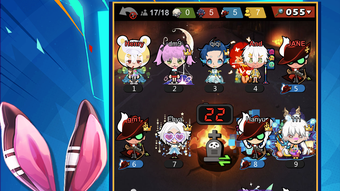
Werewolf Wowgame is a desktop application designed for social interaction and entertainment, combining the strategic depth of social deduction games with immersive roleplay elements. The software enables users to participate in online games where players assume different roles within dynamic storylines, fostering teamwork, deception, and real-time decision-making. It caters to young adults and social gamers seeking engaging, interactive experiences beyond traditional gaming platforms. The application supports online multiplayer modes, allowing real-time voice communication, chat functionality, and collaborative gameplay across diverse narratives.
Users can explore various themed environments, express themselves through customizable avatars, and form connections through built-in dating and friendship systems. The integration of music, dancing, and costume customization adds a layer of personal expression and visual appeal. With its focus on social engagement, Werewolf Wowgame aims to create a vibrant digital space where players can bond, compete, and enjoy creative self-expression. The software is suitable for casual users and those interested in interactive storytelling and online community building.
Key Features & Capabilities
- Roleplay-Based Gameplay: Players assume unique roles in evolving story-driven scenarios, promoting strategic thinking and narrative immersion.
- Real-Time Voice Chat: Facilitates immediate communication during gameplay, enhancing collaboration and social dynamics.
- Character Customization: Offers a range of costumes, pets, and accessories to personalize avatars and reflect individual style.
- Interactive Dating System: Enables users to form romantic connections, go on virtual dates, sing together, and dance in shared spaces.
- Online Multiplayer Mode (Wowgame Go): Supports large-scale online sessions with diverse storylines and dynamic role assignments.
- Entertainment Integration: Combines gaming with music, dance, and social interaction to create a multifaceted experience.
These features allow users to engage in both competitive and cooperative play, balancing logic and creativity. For example, a player might use strategic deception in a werewolf role while simultaneously using dance moves to build rapport with others. The customization tools empower users to craft distinct identities, while the dating system encourages long-term social engagement. The software supports a wide range of social behaviors, making it ideal for users who value expression, connection, and imaginative play.
User Interface, Workflow & Performance
The user interface is designed around intuitive navigation, with clearly labeled menus and visual cues to guide players through game modes, settings, and social features. Main screens likely include access to ongoing games, friend lists, avatar customization panels, and the dating hub. The workflow emphasizes ease of entry into multiplayer sessions, with streamlined matchmaking and quick-start options for new players.
Navigation between game phases—such as discussion, voting, and role reveals—is expected to be smooth, with minimal lag between transitions. The application uses cartoon-style visuals that are lightweight and optimized for consistent rendering. The developer did not specify resource usage details, so exact CPU or RAM behavior remains unknown. Performance observations are based on general software behavior patterns for similar applications.
Stability during extended sessions appears to be a focus, given the emphasis on real-time interaction. The application likely maintains background processes efficiently to support voice chat and multiplayer synchronization. However, specific performance benchmarks or crash reports were not provided. Users should expect a standard desktop application experience, with responsiveness dependent on system configuration.
Compatibility & System Requirements
Werewolf Wowgame is compatible with both Windows and Mac operating systems. The software is available in version 1.0 and has an installation size of 256MB, indicating a lightweight footprint suitable for most modern desktops. The developer did not provide additional system requirements, so exact hardware specifications such as processor speed, RAM, or graphics capabilities remain unspecified.
Platform compatibility information is limited to the operating systems listed. Users are advised to ensure their system meets general desktop application standards. The software may require internet connectivity for multiplayer functionality, though this was not explicitly stated. The installation process is expected to be straightforward, given the modest file size and standard desktop application format.
Pros and Cons
Pros
- Combines social deduction with roleplay and dating features for a unique experience.
- Lightweight installation size (256MB) for quick setup and minimal storage use.
- Supports real-time voice communication for immersive gameplay.
- Offers extensive character customization with costumes, pets, and accessories.
- Free to download and use, removing cost barriers to entry.
Cons
- Exact system requirements were not listed, which may affect compatibility for some users.
- Performance details such as CPU or RAM usage were not provided.
- Limited information on offline functionality or data privacy practices.
- Dependence on online connectivity for core features may restrict access in low-bandwidth areas.
- Long-term stability and update frequency are unknown due to lack of release history.
FAQ Section
Is Werewolf Wowgame available for both Windows and Mac?
Yes, the software is compatible with both Windows and Mac operating systems as stated in the product details.
Is the software free to use?
Yes, Werewolf Wowgame is available at no cost, with no subscription or in-app purchase requirements mentioned.
Does the software require an internet connection?
Given its online multiplayer and real-time communication features, the application likely requires a stable internet connection to function properly.
Can I use Werewolf Wowgame offline?
There is no information available on offline functionality. The software’s core features appear to rely on online connectivity.
What kind of updates can I expect?
As version 1.0 is the current release, update frequency and future feature plans are not specified. Users should monitor official channels for announcements.
Final Thoughts
Werewolf Wowgame presents a fresh take on social gaming by merging roleplay, deduction, and interactive dating within a single desktop application. Its blend of strategic gameplay, expressive customization, and real-time social features offers a compelling experience for users who enjoy creative interaction and community-driven entertainment. The lightweight design and free access make it accessible to a broad audience, while the cartoon visuals and dynamic narratives add visual appeal.
While specific performance data and system requirements are not detailed, the application’s structure suggests a smooth experience on standard desktop systems. The lack of technical documentation may be a concern for advanced users, but casual players should find it easy to start and enjoy. For those seeking a fun, expressive, and socially engaging desktop tool, Werewolf Wowgame stands out as a promising option.
Download Werewolf Wowgame now and step into a world where every role tells a story, every chat sparks a connection, and every dance builds a memory.







